
8 min read
I used to work in customer service at a technology company where API connections that extract user data from other programs were an integral part of the product. When I explained to customers why we couldn’t access a particular data item, developers often recommended the response: “It’s not available via the API.”
At the time, I thought of an API as being like a USB port, and by connecting to that port, we would have access to everything in another program. It turns out I was wrong.
Also read: Zapier vs IFTTT: the best tool for task automation
APIs are less like USB ports or fire hoses and more like a person in a help center in a foreign country. An API won’t give you all the information or the code of a program (like a fire hose), because what would stop you from replicating the entire codebase? Instead, an API provides you with data that its programmers have made available to external users. Even so, you need to know how to ask the right questions in order to do anything with that data.
What is an API?
API stands for application programming interface. The most important part of this name is “interface,” as an API essentially speaks to a program on your behalf. You still need to know the language to communicate with the program, but without an API, you won’t get far.
When programmers decide to make some of their data publicly accessible, they “expose endpoints,” which means they publish part of the language they used to create their program. Other programmers can then extract data from the application by creating URLs or using HTTP clients (special programs that create the URLs for you) to request data from those endpoints.
Endpoints return text meant for computers to read, so it won’t make sense if you don’t understand the computer code used to write it.
TL; DR: An API allows one program to request data from another.
Why use an API
Computers make many things easier, especially tasks that involve collecting and sorting through tons of data. Suppose you wanted to know how many times a third party has submitted invoices to your company. You could go into your company’s invoice records, scan the “from” data entry, and print each invoice individually for your audit.
On the other hand, if all invoices were uploaded to a central database, you could write a simple program that accesses that database and finds all instances of the partner’s name. This would take much less time and be much more accurate.
Architecture of an API
APIs consist of three parts:
- User: the person making a request
- Client: the computer sending the request to the server
- Server: the computer responding to the request
Someone will build the server first, as it acquires and holds data. Once this server is running, programmers publish documentation, including the endpoints where specific data can be found. This documentation tells external programmers the structure of the data on the server. An external user can then query (or search) the data on the server, or create a program that performs searches on the database and transforms that information into a different, usable format.
It’s super confusing, so let’s take a real-world example: a phone book.
In the analog age, you would receive a copy of the White Pages phone directory, which listed all the people in your city by name and address, in alphabetical order. If you needed a friend’s address, you could look them up by last name, find the address, and then look up their street on the maps included on the back. This was a limited amount of information, and it took a lot of time to access. Now, thanks to the magic of technology, all that information can be found in a database.
Let’s build a database containing the White Pages for a fictional city called Happyville. The people of HappyVille_WP decided that when building their database, they would create a few categories of information with nested data below. These are our endpoints, and they will include all the information that the API will publish to an external program.
Here are the endpoints listed in the HappyVille_WP documentation:
- /names
- /first_name, /last_name
- /addresses
- /street_address, /email_address/
- /phones
- /home_phone, /mobile_phone
Obviously, these are not all the information that can be collected about a person. Even if HappyVille_WP collected more private information about the residents of Happyville (like birth dates and social security numbers), that data would not be available to external programmers without knowing the language of those endpoints.
These endpoints tell you the language you need to use to request information from the database. If you want a list of all the people in Happyville with the last name Smith, you can do one of two things:
- Make a URL request in a browser for that information. This uses your Internet browser as a client, and you will get a text document in coding language to sort. This URL might look like this: http://api.happyville_wp.com/names?last_name=smith
- Use a program that requests the information and translates it into a usable form. You can code your own program or use a ready-made HTTP client.
The first option is ideal for making simple queries with only a few responses (all the people in Happyville with the last name Xarlax, for example — I’m pretty sure there are only six households with that name in Happyville). The second option requires more coding fluency but is ideal for programmers who want to use another program’s database to enhance their own applications.
Many companies use the open APIs of large companies like Google and Facebook to access data that might not otherwise be available. In this case, APIs significantly lower the barriers to entry for small businesses that would otherwise have to compile their own data.
Actions you can take via an API
Wow! Okay, so an API is how two computers talk to each other. The server has the data and defines the language, while the client uses that language to request information from the server (for your information, servers do not send data without a client requesting data, but developers have found ways to work around this with webhooks). APIs can do everything!
Not so fast. The language and syntax of APIs severely limit their capabilities. There are four types of actions an API can perform:
- GET: requests data from a server — can be a state or specifics (like last_name)
- POST: sends client modifications to the server; think of this as adding information to the server, like making a new entry
- PUT: revises or adds existing information
- DELETE: removes existing information
When you combine the endpoints with these actions, you can search or update all the information available via an API. You will need to check the API documentation to know how to code these actions, as they are all different.
While we’re talking about language and syntax, let’s cover the ways you can make a request on a server:
HTTP: hypertext transfer protocol. This is how you arrived at our site in the first place, by typing a URL into your browser’s search bar. It’s a really easy way to access data, but it won’t come back to you in a pretty format if you request a lot of information. We’ll go deeper into this in a second.
Text formats: XML, JSON. These are the main languages for accessing data via an API. When you receive your data, you will need to sift through the XML or JSON code to understand what the server has given you.
Getting started with an API
Most of the API uses you will see in your daily professional life move information from one program to similar form fields in another program. This is particularly useful when you are trying to share information that you would otherwise have to enter repeatedly — for example, sharing leads between your marketing automation platform and your CRM.
The uses and examples we will list here are much more basic and draw much less than what your standard API is good for. But they will give you a good idea of the steps in the API process.
- Most APIs require an API key. Once you find an API you want to play with, check the documentation for access conditions. Most APIs will ask you to go through an identity verification process, like logging in with your Google account. You will receive a unique string of letters and numbers to use when accessing the API, instead of just adding your email and password each time (which is not very secure – for more information on permissions and verifications, read this).
- The easiest way to start using an API is to find an online HTTP client, like REST-Client, Postman, or Paw. These ready-made (and often free) tools help you structure your requests to access existing APIs with the API key you received. You will still need to know some of the syntax from the documentation, but there is very little coding knowledge required.
- The best way to extract data from an API is to create a URL from the existing API documentation. This YouTube video explains how to extract location data from Google Maps via the API, and then use those coordinates to find nearby photos on Instagram.
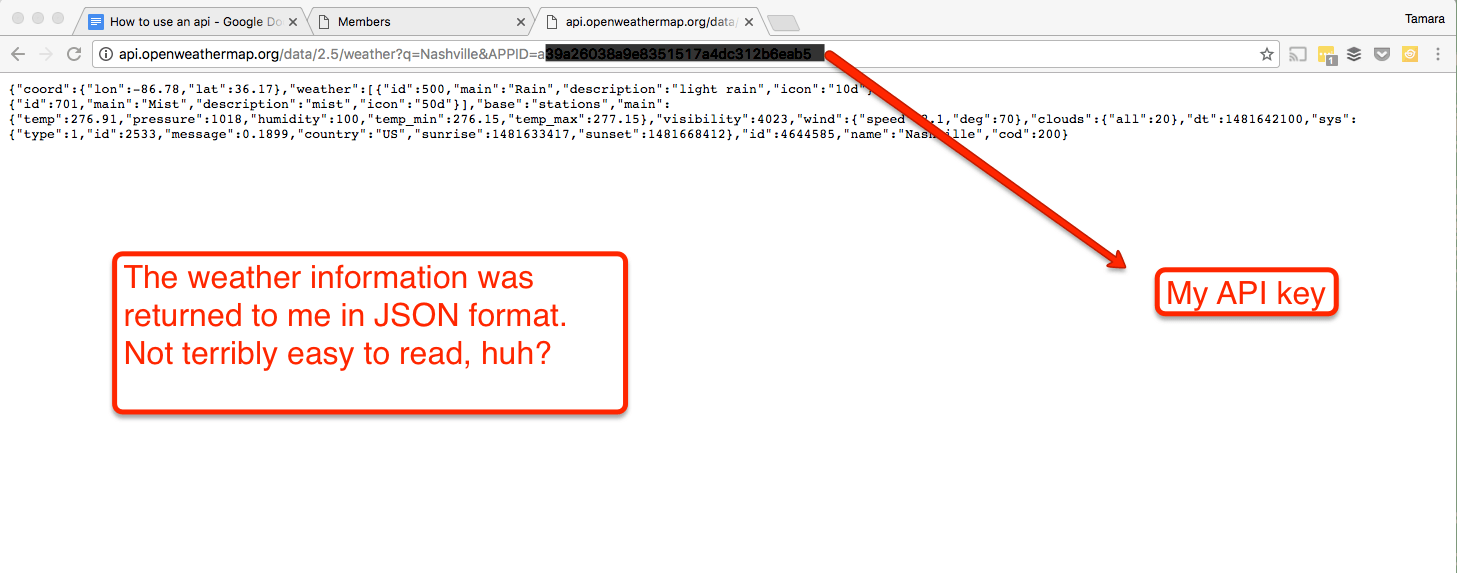
Overall, an API request doesn’t look very different from a normal browser URL, but the returned data will be in a format easy for computers to read. Here’s what happened when I requested information from the OpenWeather database in my web browser:
Example URL from the documentation — requests the weather for a particular city:
api.openweathermap.org/data/2.5/weather?q={city_name}
Type in your browser:
api.openweathermap.org/data/2.5/weather?q=Nashville, TN&APIID={numberslettersnumbersletters}
 Conclusions and further reading
 Conclusions and further reading
An API is useful for extracting specific information from another program. If you know how to read the documentation and write the requests, you can retrieve a lot of good data, but it can be overwhelming to parse all of it. That’s where developers come in. They can create programs that display data directly in an application or browser window in an easily consumable format.
This article barely scratches the surface of API technology. I did some web research to learn more about APIs. Here are the articles and videos that helped me the most:
- Using APIs: not quite as hard as it seems
- How to use APIs with JavaScript
- Web APIs for non-programmers
- Zapier API course
- REST API concepts and examples
- What are APIs and why they are important
Want to connect your programs but don’t have the time to build a client? There are many companies that will connect existing APIs or build custom connections for you. These can range from simple data-triggered applications like Zapier to large-scale Business Intelligence integrations that pull huge amounts of data from multiple sources for analysis. Knowing how an API works is the first step to building great integrations.
Read more on blog-introduction.fr