Since the creation of the “impot.gov” space, the sending of tax notices by mail has become rare. It is not uncommon to know how to retrieve a tax notice, a housing tax notice, or a tax return from previous years. The good thing about the online space is that all these documents are stored and available for you. Have you lost one? It only takes a minute to find, view, or print a lost tax notice. An update is made on the step-by-step approach to retrieve a tax notice or a tax document from previous years.
How to find a tax notice, a tax return, property tax…
To start, join the “tax government” and access your personal space by clicking on the blue box. If you have lost your, check this article on how to find a lost tax number.

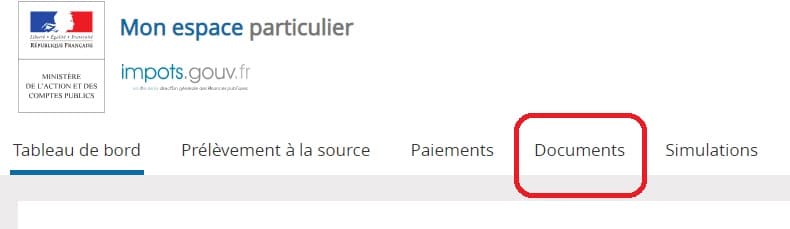
Once logged into tax.gov, click on “documents” at the top of the first page. All documents for each year are included in this section.
On the page that appears, simply navigate between the years via the following tabs.
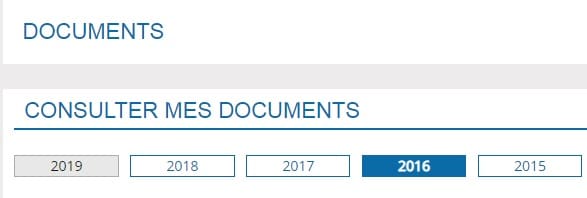
Then, you have come to the right place. You will then find and can view or download: tax reviews, property taxes, housing taxes, and lost tax returns.
Tax notices, returns, loss of housing tax… how to find them?
You will be able to access tax returns and notices from previous years (up to 10 years ago). Just find all the lost documents! You can print or download them if necessary, they are all in pdf format. Simply navigate between the years and you will see all your documents. If one is missing, it is because the tax authorities have not yet been informed.
Find all our tips to pay less tax on the 2021 tax return.
If you wish to contact the tax authorities responsible for your home directly and quickly, find here: Email, hours, and address of all tax centers in France.